Traffic, keywords, and competitors on the domain you publish from

Most AI writing tools guess at topics. Jeenie pulls estimated organic visibility for your live site, then lets you queue the next article from a keyword you already rank for.

Analyze the same domain you publish from

Brand analytics uses the domain on your brand profile — not a Search Console property you have to connect separately. After an analysis completes, Jeenie queues the first ranking pull automatically.

Refresh whenever positioning changes. Until then, traffic, keywords, and competitors stay anchored to the site you already write for.
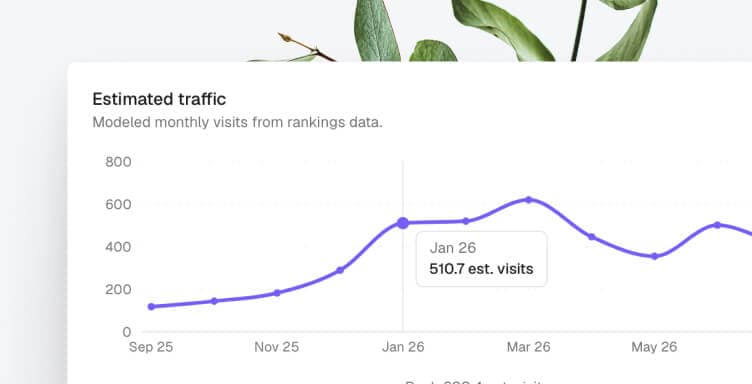
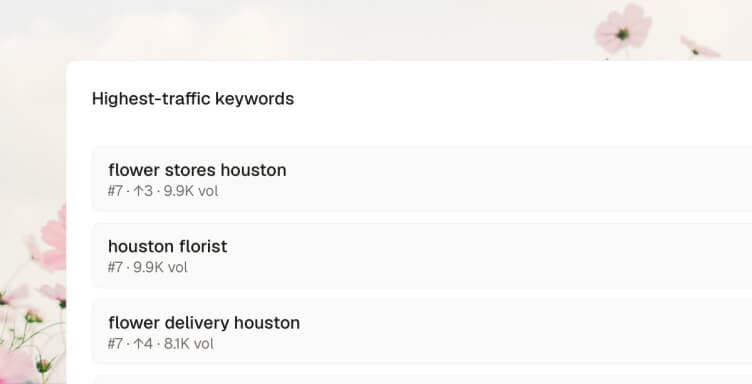
Chart estimated traffic over time

See modeled monthly organic visits and how visibility moved. This is Labs-estimated traffic from rankings — not an analytics pixel, and not Google Search Console.

New or small sites often show a thin history. The chart fills in as the index has enough monthly points to plot.

Rank the keywords you already own

Filter and sort the terms your domain ranks for — volume, position, estimated traffic. Page-one keywords sit next to long-tail queries you can still grow.

Each row is a real ranking, not a keyword tool’s industry dump. Use it to see what is already working before you queue the next article.

Write from a keyword that already has signal

Queue an article from a ranking term instead of a blank prompt. Suggested topics also come from cluster follow-ups on keywords you already rank for.

Competitors show domains that rank for similar queries, with overlap counts — so you can see who you are actually sharing SERPs with.

A ranking snapshot — not a disconnected SEO tool

After a brand analysis, you get estimated monthly visits, keyword counts by position, top ranking terms, and competitor overlap. Write from any keyword without leaving the loop.

Data is third-party estimated rankings, not Search Console. Want a feel for the domain first? Run the free preview.

Rankings snapshot

acme.com

Estimated Google organic visibility

Est. visits / mo
12.4k
Keywords in top 100
186
Page-one keywords
41
Moved this week
12 up · 7 down

Highest-traffic keywords

  • weekly category stories

    #4 · 2.4k vol

    Write
  • shopify seo checklist

    #8 · 1.8k vol

    Write
  • ecommerce content ops

    #11 · 980 vol

    Write

Competitors

  • rivalbrand.com42 overlap
  • contentlab.io31 overlap
  • growthstack.co18 overlap

What brand analytics actually shows

One domain in. Traffic, keywords, and competitors out — the same snapshot your writing pipeline can act on.

Estimated monthly traffic chart

Historical traffic

Modeled monthly organic visits from rankings data, with a 12-month view of how visibility moved.

Highest-traffic keywords list

SEO keywords

Rank, volume, and estimated traffic for terms you already rank for — then queue an article with Write.

Competitor websites list

Competitor analysis

Domains that rank for similar keywords, with overlap counts so you can see who shares your SERPs.

Why rankings sit in the publishing loop

Analytics that never become a brief just sit in a tab. Brand analytics is the input that keeps scheduled content pointed at terms you already have a chance to win.

  • Publishing that follows the data

    The next article starts from a ranking you can see — not a brainstorm in a blank doc.

  • Topics with existing demand

    Suggested topics come from cluster follow-ups on keywords you already rank for, each with a one-line why.

  • Competitors you can actually name

    Overlap is based on shared ranking keywords, not a list of brands someone guessed in a slide.

  • One loop from ranking to live post

    Write opens generate with the keyword filled in. Brand voice, fact-check, and CMS publish still run on that job.

Put Your Content Publishing on Autopilot.

Connect your CMS, set your cadence, and let Jeenie handle the rest from research to draft to post.